
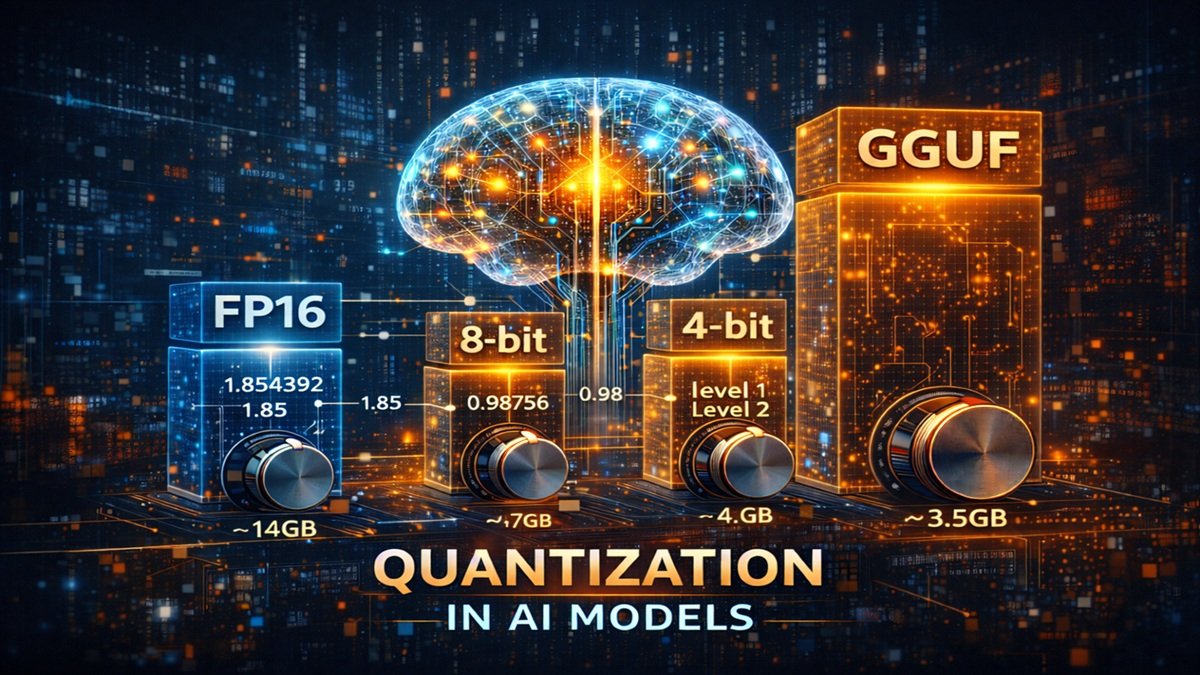
Quantization in AI Models (4-bit, 8-bit, GGUF) — A Clear Detailed Guide
Modern AI models are extremely large.
Even a “small” language model can contain billions of numbers inside it.
Because of this, one big problem appears:
The model is smart — but too heavy to run on normal computers.
For example:
| Model | Memory Needed (Normal Precision) |
|---|---|
| 7B | ~14 GB RAM |
| 13B | ~26 GB RAM |
| 70B | ~140 GB RAM |
Most laptops and consumer GPUs simply cannot run them.
The solution that made local AI possible is called:
Quantization
This is one of the most important concepts in practical AI usage.
What Quantization Actually Means
Quantization is the process of storing model numbers using fewer bits while keeping behavior almost the same.
Instead of storing extremely precise values, the model stores approximations.
Example:
Original value: 0.123456789
Quantized:      0.12
The AI does not need perfect precision to behave correctly.
It only needs numbers close enough.
So we trade:
tiny accuracy loss → massive memory savings
Why AI Models Are So Large
A neural network contains parameters (weights).
Each parameter is stored as a floating-point number:
| Format | Bits per number | Memory |
|---|---|---|
| FP32 | 32 bits | training precision |
| FP16 | 16 bits | inference precision |
If a model has 7 billion parameters:
7,000,000,000 × 16 bits ≈ 14GB
That is why models are huge — not because of stored text, but because of stored numbers.
The Core Idea Behind Quantization
Instead of storing exact numbers, we store them in a limited range of levels.
Imagine measuring height:
| Real Measurement | Quantized Measurement |
|---|---|
| 171.382 cm | 171 cm |
| 171.491 cm | 171 cm |
| 171.877 cm | 172 cm |
You lose precision, but meaning remains usable.
AI works the same way.
8-bit Quantization
Each number uses 8 bits instead of 16 bits.
So memory becomes half.
| Model | FP16 | 8-bit |
|---|---|---|
| 7B | ~14GB | ~7GB |
| 13B | ~26GB | ~13GB |
Quality Impact
Very small difference.
Usually 95–99% performance retained.
This format is commonly used for GPU inference.
4-bit Quantization
Each number uses only 4 bits.
Now the model becomes about four times smaller than FP16.
| Model | FP16 | 4-bit |
|---|---|---|
| 7B | 14GB | ~3.5GB |
| 13B | 26GB | ~6–7GB |
Quality Impact
Slightly reduced accuracy but still usable for:
- chat
- coding
- summarization
- general reasoning
This is what makes CPU-based local AI possible.
How the Model Still Works After Compression
Instead of storing exact values:
0.1827
0.1932
0.1761
0.1894
The model stores discrete levels:
Level 1
Level 2
Level 1
Level 2
During runtime, the system reconstructs approximate values.
This step is called de-quantization.
So the model behaves almost like the original.
What GGUF Is
GGUF is a special file format designed for running quantized models efficiently.
It is used by tools like local inference engines.
GGUF contains:
- compressed model weights
- tokenizer
- metadata
- runtime optimizations
In simple terms:
GGUF is a ready-to-run compressed AI brain file.
Without formats like GGUF, local AI would require massive server hardware.
Normal Model vs GGUF Model
| Feature | Standard Model | GGUF Model |
|---|---|---|
| Memory usage | Very high | Optimized |
| CPU support | Poor | Excellent |
| Plug-and-play | Difficult | Easy |
| Local usage | Hard | Practical |
Important Insight
Quantization does not remove knowledge.
It reduces numerical precision, not learned relationships.
Think of π:
| Precision | Value |
|---|---|
| Full | 3.1415926535 |
| Reduced | 3.14 |
Most calculations still work.
AI behaves similarly.
Why Quantization Enabled Local AI
Before quantization:
Running an AI required expensive GPUs and servers.
After quantization:
A normal laptop can run advanced models offline.
This is the single biggest reason local AI ecosystems became popular.
Final Understanding
Training uses high precision because learning requires accuracy.
Usage uses compressed precision because prediction tolerates approximation.
So the workflow becomes:
Training → precise brain
Inference → compressed brain
Explore related articles:
- Understanding 7B, 13B, and 70B in AI Models — What “Parameters” Really Mean
- Transformer Architecture in Artificial Intelligence — A Complete Beginner-to-Advanced Guide
- Artificial Intelligence Architectures Explained: From Rule-Based Systems to Transformers and Modern LLMs
- CPU vs GPU: What’s the Difference and Why It Matters for AI, Gaming, and Everyday Computing
- Build Your Own Free Offline AI Chatbot Using Ollama + Open WebUI (Complete Guide)
- Regular LLM vs Reasoning LLM: What’s Actually Different and Why It Matters
- Popular Prompt Frameworks: A Practical Guide to Getting Better Results from AI


