
FP32 vs FP16 vs BF16: Complete Guide for AI, Deep Learning, and Modern Hardware
Introduction
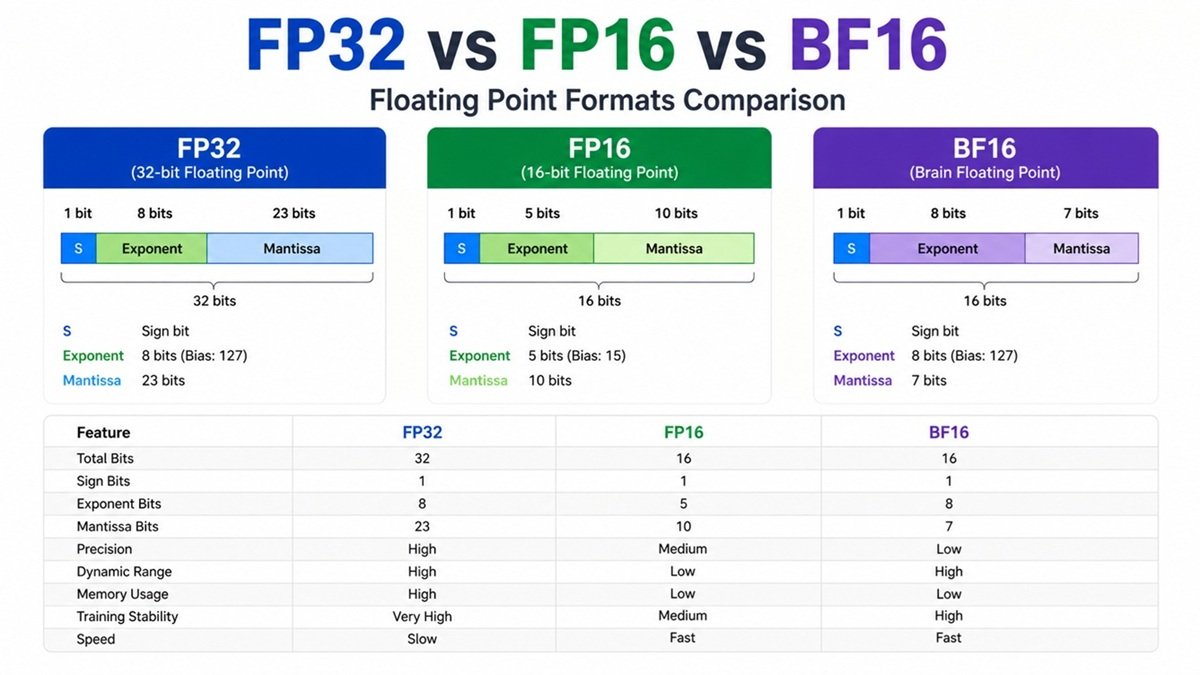
In modern deep learning, numerical precision formats play a critical role in determining model performance, speed, and memory usage. The three most widely used formats are:
- FP32 (32-bit floating point)
- FP16 (16-bit floating point)
- BF16 (bfloat16 – Brain Floating Point)
Understanding these is essential if you’re working with frameworks like PyTorch, TensorFlow, or deploying models on GPUs like NVIDIA A100.
Read This: Learning Rate in AI/Machine Learning/LLM: A Deep, Practical Guide
What is Floating Point Representation?
Floating point numbers represent real numbers in computers using three components:
- Sign bit (positive/negative)
- Exponent (range)
- Mantissa (fraction) (precision)
General structure:
Value = (-1)^sign × mantissa × 2^exponent
The difference between FP32, FP16, and BF16 lies in how many bits are allocated to each part.
FP32 (Single Precision Floating Point)
Structure
- Total bits: 32
- Sign: 1 bit
- Exponent: 8 bits
- Mantissa: 23 bits
Key Characteristics
- High precision and accuracy
- Large dynamic range
- Default format in most ML training
Advantages
- Stable training
- Less numerical error
- Good for sensitive computations
Disadvantages
- High memory usage
- Slower compared to lower precision
- Higher power consumption
Use Cases
- Initial model training
- Scientific computing
- Financial calculations
FP16 (Half Precision Floating Point)
Structure
- Total bits: 16
- Sign: 1 bit
- Exponent: 5 bits
- Mantissa: 10 bits
Key Characteristics
- Lower precision than FP32
- Smaller dynamic range
- Faster computation on modern GPUs
Advantages
- 2× lower memory usage vs FP32
- Faster training (Tensor Cores)
- Higher throughput
Disadvantages
- Gradient underflow/overflow issues
- Requires techniques like loss scaling
- Less stable than FP32
Use Cases
- Mixed precision training
- Inference optimization
- Edge AI deployment
BF16 (Brain Floating Point)
Structure
- Total bits: 16
- Sign: 1 bit
- Exponent: 8 bits
- Mantissa: 7 bits
Key Insight
BF16 keeps the same exponent as FP32 but reduces precision.
Advantages
- Same dynamic range as FP32
- More stable than FP16
- No need for loss scaling
Disadvantages
- Lower precision than FP16
- Slightly less accurate in some cases
Use Cases
- Large-scale training (LLMs, Transformers)
- Used heavily in Google TPUs
- Supported in modern GPUs like NVIDIA H100
FP32 vs FP16 vs BF16: Comparison Table
| Feature | FP32 | FP16 | BF16 |
|---|---|---|---|
| Bits | 32 | 16 | 16 |
| Exponent | 8 | 5 | 8 |
| Mantissa | 23 | 10 | 7 |
| Precision | High | Medium | Low |
| Dynamic Range | High | Low | High |
| Memory Usage | High | Low | Low |
| Training Stability | Very High | Medium | High |
| Speed | Slow | Fast | Fast |
Real-World Perspective (Deep Learning)
FP32 Training
- Most stable
- Used as baseline
- But expensive
FP16 Training
- Requires mixed precision
- Uses:
- FP16 for forward/backward
- FP32 for weights
Frameworks like PyTorch use Automatic Mixed Precision (AMP).
BF16 Training
- Becoming the default for large models
- No loss scaling needed
- Used in LLM training pipelines
Why BF16 is Winning in Modern AI
Modern architectures (Transformers, LLMs) require:
- Huge dynamic range
- Stability in gradients
- Massive parallelism
BF16 solves FP16’s biggest issue: range limitation.
That’s why companies like Google, NVIDIA, and Meta are heavily adopting it.
When Should You Use What?
Use FP32 if:
- You need maximum accuracy
- Debugging model instability
- Scientific applications
Use FP16 if:
- You want speed and memory efficiency
- Using GPUs with Tensor Cores
- You can handle loss scaling
Use BF16 if:
- Training large models (LLMs, Transformers)
- Want stability + speed
- Using modern GPUs/TPUs
Practical Example (PyTorch)
import torch
from torch.cuda.amp import autocast, GradScaler

model = ...
optimizer = ...

scaler = GradScaler()

for data, target in loader:
    optimizer.zero_grad()

    with autocast():  # FP16 mixed precision
        output = model(data)
        loss = loss_fn(output, target)

    scaler.scale(loss).backward()
    scaler.step(optimizer)
    scaler.update()
Final Thoughts
- FP32 = Accuracy king 👑
- FP16 = Speed booster ⚡
- BF16 = Best balance for modern AI 🚀


