
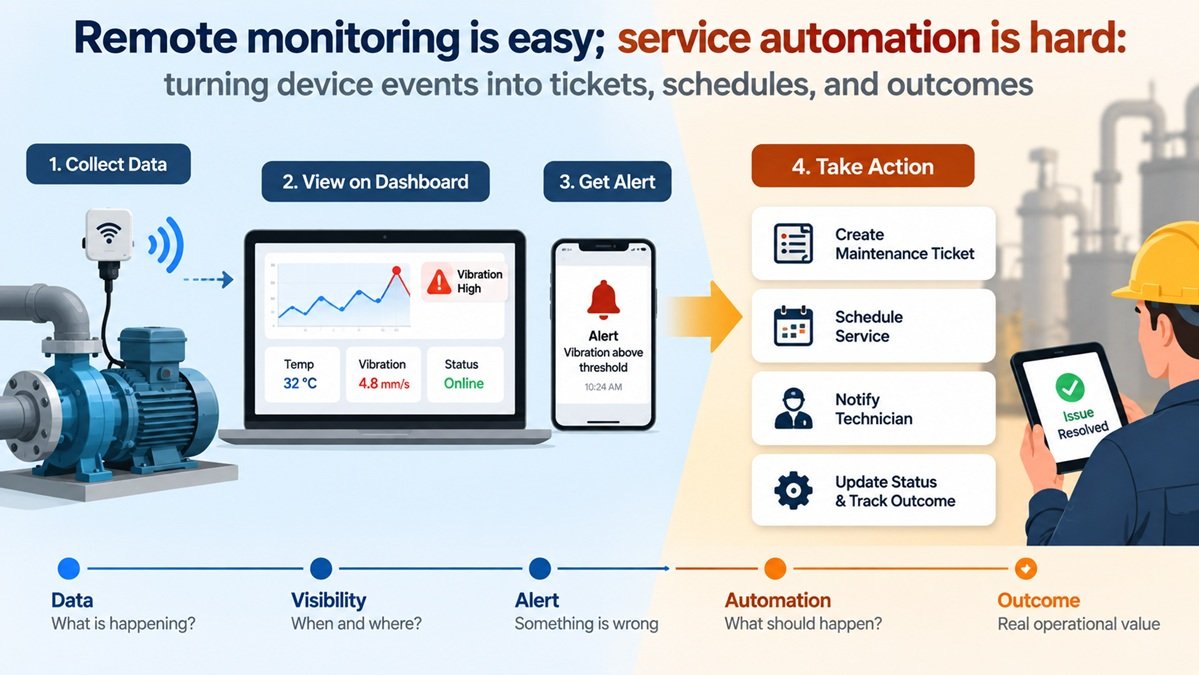
Remote monitoring is easy; service automation is hard: turning device events into tickets, schedules, and outcomes
A connected device reports its state, the data reaches a dashboard, and an alert appears when something crosses a threshold. At first glance, that already looks like automation.
The harder part starts when the alert needs a real response.
Suppose a pump reports abnormal vibration for thirty seconds. Should the system send an email? Wait to see whether the condition persists? Create a maintenance ticket? Notify the site technician? Reduce the pump’s load? Stop it altogether?
The sensor reading alone cannot answer those questions. It can tell you that something unusual happened, but not what the right operational response should be.
Many IoT projects get good at collecting data long before they get good at acting on it. Telemetry, dashboards, and alerts solve the visibility problem. Turning device events into a repeatable service process is a different layer of work.
Remote monitoring solves visibility, not the response
Remote monitoring answers a useful set of questions: what is happening, where is it happening, when did it start, and how far has a value moved outside its expected range?
That visibility is useful on its own. A dashboard can show temperature, pressure, vibration, energy use, device status, or any other signal relevant to the equipment’s operation. Historical data helps identify patterns, while alerts can draw attention to a condition that needs investigation.
But visibility does not define the response.
The same temperature reading may mean different things depending on the device, its current operating mode, the location, or the customer using it. A vibration spike during startup may be normal, while the same reading during steady operation could indicate a mechanical issue. A device going offline for two minutes may be harmless on an unreliable network but critical in a process that depends on continuous reporting.
Monitoring stops short of the response itself. It can expose a condition, but it does not automatically decide whether that condition deserves action, what kind of action is appropriate, or who should own it.
For connected equipment to become operationally useful, the data has to feed into a response process rather than stop at the dashboard.
Why an alert is not yet an automated workflow
A basic monitoring flow is often simple: a sensor publishes data over MQTT, a threshold rule detects a condition, and the system sends a notification.
For a hobby project, a lab setup, or a small installation, that may be enough. An email or push notification can be exactly the right outcome.
The process is only partly automated if the person receiving the alert still has to make every important decision manually.
Who should respond? Is the event urgent? Should a ticket be opened? Does the issue affect one device or an entire site? Should the customer be informed? What happens if nobody acknowledges the alert?
At that point, the notification is not really the workflow. It is only the handoff from the system to a human.
This also explains why simple alerting tends to become noisy as an IoT deployment grows. If every threshold crossing creates another message, operators quickly have to separate real problems from short-lived spikes, repeated events, and conditions they have already seen. More alerts do not necessarily create better awareness; they can make meaningful events harder to recognize.
An alert tells someone that something happened. Automation defines what should happen because of it.
Getting there takes more than a trigger. The system needs enough context to decide whether the event matters, a rule that maps it to an action, and a way to carry that action into the operational process that follows.
Before deciding what the system should do, though, it first has to decide whether the event is worth acting on at all.
Device events need context before they trigger action
A threshold crossing is easy to detect. Deciding what it means is harder.
Take the pump example again. If vibration briefly exceeds the normal range and immediately returns to baseline, opening a maintenance ticket may create more work than value. If the same condition persists for five minutes under normal load, the situation looks very different.
Duration is only one part of the context. A useful automation rule may also need to consider severity, operating mode, recent history, and whether the same problem has already been reported.
That can turn a raw event into something closer to an operational condition:
vibration > threshold becomes high vibration has persisted for five minutes while the pump is running normally.
The second description is much closer to something a system can act on.
Persistence rules are one simple way to filter noise. Severity provides another useful signal. A moderate temperature increase might warrant monitoring, while a critical threshold breach could require immediate intervention. Equipment state matters as well: readings that are expected during startup, calibration, or cleaning should not necessarily trigger the same workflow as those observed during normal operation.
Repeated events need special treatment too. If a fault remains active for twenty minutes, creating a new ticket every time another reading arrives is rarely useful. The system needs to recognize that these readings belong to an existing incident, suppress duplicates, or update the current event instead.
Scale makes this harder to ignore. A rule that seems harmless with ten devices can generate hundreds of unnecessary alerts across a larger fleet.
The goal is not to automate every event, but to identify the ones that actually deserve a response.
Once that filtering and classification step is in place, automation can move beyond notification and begin coordinating what happens next.
From alerting to automation: deciding what should happen next
By now, remote monitoring has done its job: the system knows that something meaningful has happened. What remains is deciding how to respond.
Practical IoT automation can connect device events with service workflows and automated actions: creating a maintenance ticket, calling an external API, notifying the responsible person, updating another system, or scheduling follow-up work. The trigger is only the starting point. What matters is the logic that decides which action fits the situation and how its outcome will be tracked.
A more complete flow might look like this:
device event → validation/context → rule → action → external workflow → confirmation
For the vibration example, the platform might wait until the condition persists for five minutes, classify it as a maintenance issue, create one ticket rather than a stream of duplicate alerts, and assign it to the team responsible for that equipment.
The same system may handle another event very differently. A low-severity condition might only be logged and flagged for the next scheduled inspection. A critical temperature event might trigger an immediate operator notification and a predefined safe-state command. A loss of connectivity could create a service task only after the device has missed several expected reports.
It helps here to separate reusable platform mechanics from the logic that belongs to a particular application.
Collecting events, evaluating rules, sending notifications, calling webhooks, managing users, and connecting external systems are common capabilities that can be reused across many IoT solutions. The details of the response are much more specific.
One company may want a fault to trigger a ticket in its service desk system. Another may need to update a CRM record and notify a regional contractor. For one equipment type, five minutes above a threshold could be critical; for another, it may be perfectly normal. Escalation paths, maintenance schedules, customer notifications, and responsibility rules all depend on how the connected service actually operates.
Keeping those two layers separate makes the automation easier to evolve. The underlying mechanisms do not have to be rebuilt whenever the business changes its service process. Instead, the rules and integrations around a particular use case can be adjusted as equipment, customers, or operating procedures change.
Even a well-designed happy path covers only part of the problem. Real workflows also have to handle a ticket that cannot be created, an unavailable API, a technician who never responds, or a device that disappears before the issue is resolved.
Design workflows for failures and exceptions too
Production workflows also need to handle the cases where systems or people do not respond as expected.
Suppose the automation has identified a valid maintenance event and tries to create a ticket through an external API. What happens if that API is temporarily unavailable? Retrying may solve the problem, but retries also need limits. If the request reached the service desk but the response was lost, blindly sending it again could create duplicate tickets.
The same problem appears at other points in the chain. A technician may never acknowledge an assigned task. A device may go offline after reporting the fault. A remote command may be sent without any confirmation that the equipment actually changed state.
None of this is unusual in a connected system. Devices, networks, third-party services, and people all introduce uncertainty.
The workflow needs a defined response to those failures. That may include retry policies, timeouts, duplicate suppression, fallback notifications, or escalation to another person when no acknowledgement arrives within a defined period.
Different failures call for different responses. A failed CRM update may simply be retried after a delay. A failed safety-related action may need immediate escalation. A missed technician acknowledgement could trigger a second notification or transfer the task to another team.
Manual intervention should remain possible as well. Automation is useful because it reduces repetitive decision-making, not because every situation can or should be handled without a human.
Failure handling needs to be designed alongside the happy path. Otherwise, the system may automate the easy part while leaving the hardest cases unhandled.
Close the loop: track outcomes, not just triggers
Creating a ticket is an action. It is not an outcome.
If the system stops tracking the process at that point, it still cannot answer an important operational question: was the problem actually resolved?
A more useful workflow tracks what happens after the trigger. The ticket may be acknowledged, assigned, marked as in progress, resolved, or closed as a false alarm. A technician may complete an inspection. The equipment may return to its normal operating range. A remote command may succeed or fail.
Those states can become part of the service history for the device or asset.
In its simplest form, the loop starts with a device issue, carries it through the appropriate service action, and ends with an updated device or service state that reflects the result. Closing the loop also helps improve the rules that started the workflow in the first place.
If a particular alert repeatedly produces tickets that technicians close without action, the event logic may be too sensitive. If the condition behind a warning often develops into a serious fault before anyone responds, the escalation rule may need to change. The system becomes easier to tune when the outcome of an action remains connected to the original device event.
Otherwise, automation easily turns into little more than automated task generation. The goal is not to produce more tickets, messages, or API calls. The goal is to move an operational issue toward a known result with less manual coordination.
Make device data actionable, not merely visible
Remote monitoring answers the first question: what is happening with the device?
Service automation has to answer several more: does this event matter, what should happen next, who should own the response, and how do we know when the process is complete?
Not every device event needs a workflow. In many cases, better automation means filtering noise, waiting for enough context, and doing nothing until the event becomes meaningful.
When an event does require action, the response should be clear. A validated event can trigger a ticket, a notification, a scheduled inspection, a system update, or another response that fits the situation. Exceptions need their own handling, and the result should remain visible after the initial trigger.
That is the step that turns device data from something you can observe into something the rest of the operation can actually use.


