
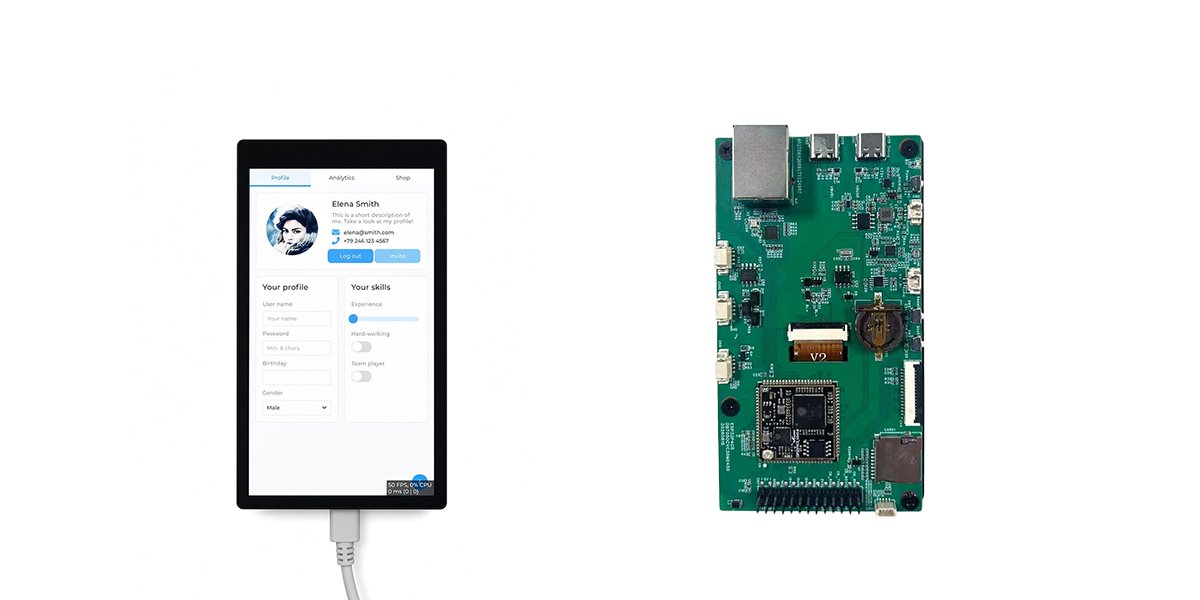
Building LVGL Interfaces with ESP32-P4
Introduction
Embedded devices are becoming more interactive as Internet of Things (IoT) applications continue to evolve. Modern smart home controllers, industrial monitoring equipment, portable instruments, and intelligent control panels increasingly require graphical interfaces that allow users to monitor information and interact with connected hardware.
Traditional character-based LCD modules are suitable for displaying simple information, but they offer limited flexibility when an application requires multiple pages, interactive buttons, real-time charts, or customized visual elements.
The ESP32-P4 provides an interesting platform for developing more advanced embedded applications. When combined with LVGL (Light and Versatile Graphics Library), developers can create graphical user interfaces (GUIs) that support touch interaction, dynamic data presentation, and customized application layouts.
This article explores how to develop an LVGL-based interface with ESP32-P4, including development environment preparation, LCD initialization, touch integration, interface programming, and firmware deployment. It also explains how these technologies can be applied to practical IoT projects.
Why Choose LVGL for ESP32-P4 LCD Development?
LVGL is an open-source graphics library designed specifically for embedded systems. It provides reusable graphical components and rendering functions that simplify the development of interactive user interfaces.
Instead of implementing every graphical element manually, developers can use predefined widgets to build application layouts.
Some commonly used LVGL components include:
- Buttons for user commands and device control.
- Labels for displaying text, measurements, and system status.
- Sliders and switches for adjusting operating parameters.
- Progress bars for displaying task completion or system activity.
- Charts for visualizing sensor readings and historical data.
- Lists and menus for organizing application functions.
- Multiple screens for separating different application sections.
One important advantage of LVGL is that it separates interface presentation from application logic.
For example, a smart home dashboard might display room temperature, lighting status, and device connection information. LVGL manages how this information appears, while the application firmware handles sensor communication, data processing, and hardware control.
This separation makes applications easier to maintain and expand as project requirements change.
What Makes ESP32-P4 Suitable for Graphical Applications?
The ESP32-P4 is designed for applications that require more advanced processing and multimedia capabilities than basic microcontroller projects.
It provides a suitable hardware foundation for embedded HMI development, interactive control interfaces, and IoT devices that need graphical information presentation.
When selecting an ESP32-P4 development platform, developers should consider several hardware characteristics.
Display resolution and size
Display resolution determines how much information can be presented and how detailed the interface can become. A higher resolution provides more space for graphical elements, but it also increases rendering and memory requirements.
For compact control panels, a 5-inch LCD can provide a useful balance between display area and product size.
Touch input
A capacitive touch panel allows users to interact directly with buttons, menus, sliders, and other graphical elements. Developers should ensure that the touch controller and its driver are compatible with the firmware integration.
Display interface and drivers
The LCD interface, controller, resolution, color format, and initialization sequence must match the actual hardware. These details are essential for reliable image rendering.
Memory and performance
Graphical applications require memory for frame buffers, interface objects, fonts, and image resources. Developers should consider these requirements when designing complex interfaces.
Preparing the ESP32-P4 Development Environment
Before creating an LVGL application, developers need to prepare the hardware and software environment.
The main components include:
| Component | Purpose |
| ESP32-P4 development kit | Runs the application firmware |
| LCD display | Presents graphical information |
| Capacitive touch panel | Receives user input |
| ESP-IDF | Provides the development framework |
| Visual Studio Code | Provides the code editing environment |
| LVGL | Provides graphical interface components |
| Display driver | Initializes and controls LCD output |
| Touch driver | Reads touch coordinates and input events |
ESP-IDF is Espressif’s official development framework for ESP32-series devices. It provides the build system, peripheral APIs, component management, and firmware flashing tools required for embedded development.
Developers can follow the official ESP32-P4 getting-started documentation to install the development environment.
After installation, configure the project for the ESP32-P4 target:
idf.py set-target esp32p4This command selects the target chip for the project. It does not automatically configure the LCD or touch controller, which still requires hardware-specific initialization.
Once ESP-IDF is working correctly, developers can prepare the LVGL integration.
Integrating LVGL into an ESP32-P4 Project
LVGL can be integrated into an ESP-IDF project through the ESP Component Manager.
One practical approach is to use Espressif’s LVGL port component, which helps connect the graphics library with supported display and input devices.
For example, a project can add the component using:
idf.py add-dependency "espressif/esp_lvgl_port^2.3.0"The version shown is an example. Developers should check the current component documentation and select compatible versions for their project.
Another option is to add LVGL directly as a project dependency:
idf.py add-dependency "lvgl/lvgl^9.*"These approaches should not be combined indiscriminately. Developers should follow the dependency structure of their selected integration and avoid installing conflicting LVGL versions.
After adding the required components, configure the project so that the graphics library can communicate with the LCD and touch hardware.
Initializing the LCD and Touch Panel
Integrating LVGL is only one part of developing an embedded graphical application. The display and touch hardware must also be initialized correctly.
The LCD initialization process typically involves configuring:
- Display interface and communication settings.
- LCD controller initialization commands.
- Horizontal and vertical resolution.
- Pixel format and color configuration.
- Frame buffer allocation.
- Display transfer and refresh operations.
The touch panel requires a separate initialization process. Its driver must communicate with the touch controller, obtain touch coordinates, and pass input events to LVGL.
For a capacitive touch display, developers should also verify that the reported coordinates correspond correctly to the displayed interface.
A typical initialization workflow is:
- Initialize the ESP32-P4 peripherals required by the development board.
- Configure the LCD controller and display parameters.
- Initialize the capacitive touch controller.
- Register the display device with LVGL.
- Register the touch input device.
- Configure the LVGL task or periodic handler.
- Test basic rendering and touch response.
The exact implementation depends on the LCD controller, touch controller, and board design.
Using a hardware-specific example project can significantly reduce integration work because the display initialization and driver configuration may already be available.
Creating a Custom LVGL User Interface
Once the LCD and touch panel are working correctly, developers can begin creating their application interface.
Consider a simple IoT control dashboard that displays device status and provides a button for controlling an output.
The following example uses LVGL 9 to create a basic interface:
#include "lvgl.h"

static void button_event_cb(lv_event_t * e)
{
    lv_obj_t * label =
        (lv_obj_t *)lv_event_get_user_data(e);

    lv_label_set_text(label, "Button clicked!");
}

void create_home_screen(void)
{
    lv_obj_t * screen = lv_screen_active();

    lv_obj_t * title = lv_label_create(screen);
    lv_label_set_text(title, "IoT Control Panel");
    lv_obj_align(title, LV_ALIGN_TOP_MID, 0, 30);

    lv_obj_t * status = lv_label_create(screen);
    lv_label_set_text(status, "Device: Ready");
    lv_obj_align(status, LV_ALIGN_CENTER, 0, -40);

    lv_obj_t * button = lv_button_create(screen);
    lv_obj_set_size(button, 180, 60);
    lv_obj_align(button, LV_ALIGN_CENTER, 0, 30);

    lv_obj_t * button_label =
        lv_label_create(button);

    lv_label_set_text(button_label, "Control Device");
    lv_obj_center(button_label);

    lv_obj_add_event_cb(
        button,
        button_event_cb,
        LV_EVENT_CLICKED,
        status
    );
}
This example creates a title, a status label, and an interactive button. When the button is pressed, the status message changes.
It demonstrates how graphical elements and event callbacks can work together.
However, this is an interface example rather than a complete firmware application. It must be called after LVGL and the display have been initialized, and the project must implement the required LVGL task or handler.
Developers using LVGL 8 should also adjust the API calls to match their installed library version.
Designing Interfaces for Real IoT Applications
A basic interface can be expanded into a more complete application by organizing information into different pages and connecting graphical components to actual device functions.
For example, a smart home controller could include separate pages for lighting, temperature monitoring, energy consumption, and device configuration.
An industrial monitoring interface might display equipment operating status, sensor measurements, warning messages, and maintenance information.
A portable instrument could use graphical meters, numerical readings, and touch-based configuration menus.
When designing these interfaces, developers should consider several practical principles.
Keep the layout simple. Important information should be easy to identify without requiring users to navigate through too many menus.
Use consistent graphical elements. Buttons, labels, colors, and navigation controls should follow a consistent design language.
Provide clear feedback. When users interact with a control, the interface should show whether the command was received or whether the device state has changed.
Consider display limitations. Font sizes, spacing, image resources, and graphical effects should be appropriate for the LCD resolution and available memory.
Separate interface and hardware logic. Keeping display code independent from sensor communication and device-control functions makes future updates easier.
Optimizing LVGL Performance on ESP32-P4
Graphical performance is an important consideration for embedded applications, particularly when displaying frequently changing information.
Several factors can influence the responsiveness of an LVGL interface.
Frame buffer management
Frame buffers store graphical information before it is transferred to the LCD. Their size and configuration affect memory consumption and display performance.
Partial screen updates
Instead of refreshing the entire display whenever a small element changes, partial rendering can reduce unnecessary data transfers when supported by the display integration.
Image and font resources
Large images and unnecessary fonts increase storage and memory requirements. Developers should use appropriately sized assets and include only the resources needed by the application.
Task scheduling
LVGL processing should be scheduled consistently. Developers need to ensure that interface updates, touch input, and application tasks do not interfere with each other.
Testing under realistic conditions
A dashboard that performs well with static content may behave differently when several sensors update simultaneously or when users interact with multiple controls.
Testing with realistic workloads helps identify rendering delays, memory limitations, and input responsiveness issues before deployment.
Choosing an ESP32-P4 LCD Development Kit
Selecting a suitable development kit can simplify the hardware integration process.
For example, the APTUS 5-inch ESP32-P4 Capacitive Touch LCD Development Kit combines an ESP32-P4 development platform with a 5-inch capacitive touch LCD.
It provides a practical hardware starting point for developers building smart home dashboards, IoT control panels, embedded interfaces, and other customized graphical applications.
When evaluating a development kit, it is important to check the LCD resolution, touch functionality, driver availability, hardware documentation, and software examples.
A compatible display platform can reduce the time spent on basic hardware integration, allowing developers to focus more on application design and firmware functionality.
Conclusion
Combining ESP32-P4 with LVGL provides a flexible approach to developing graphical interfaces for modern embedded and IoT applications.
ESP-IDF supplies the development framework, LVGL provides reusable interface components, and compatible LCD and touch drivers connect the software to the physical display hardware.
By following a structured development process, developers can move from basic display initialization to interactive dashboards, multi-page control panels, and customized embedded HMI applications.
The key is to treat display integration, touch input, interface design, and application logic as connected but separate parts of the development process.
With appropriate hardware selection and performance optimization, ESP32-P4 and LVGL can serve as a practical foundation for building responsive and customizable embedded user interfaces.
Related Resources
- How to Use I2C LCD with ESP32 Using Arduino IDE
- ESP-NOW with OLED Display: Wireless Communication and Real-Time Data Monitoring
- Official LVGL Documentation
- ESP-IDF Programming Guide
Author Bio
Daniel Lee is a technology and business development professional at APTUS Display, specializing in LCD display solutions and embedded display applications. He focuses on exploring how display hardware, capacitive touch technology, and embedded development platforms can support practical IoT, smart home, and industrial HMI projects. Through technical articles and product integration insights, he aims to help developers and engineering teams better understand display selection, hardware compatibility, and customized LCD solutions.
Website: https://www.aptusdisplay.com/
LinkedIn: https://www.linkedin.com/in/daniel-lee-475654318/


